Best for selling online courses
7-day free trial; paid from $39/mo (Starter)
Visit TeachableCode blocks, video limits, transaction-fee break-even math and export lock-in, compared for developers selling a programming course.

Best for selling online courses
7-day free trial; paid from $39/mo (Starter)
Visit TeachableBest for course businesses that want a full LMS
30-day free trial; paid from $54/mo (Basic)
Visit ThinkificScroll sideways to see all 9 columns →
| Tool | Pricing | Free plan | Paid from | Transaction fee | Email marketing built in | Community | API | Custom domain | Link |
|---|---|---|---|---|---|---|---|---|---|
 TeachableSelling online courses TeachableSelling online courses | 7-day free trial; paid from $39/mo (Starter) | $39/mo | 7.5% (Starter) | Visit | |||||
 ThinkificCourse businesses that want a full LMS ThinkificCourse businesses that want a full LMS | 30-day free trial; paid from $54/mo (Basic) | $54/mo | 0% (Thinkific Payments); 5% via Stripe on Basic | Grow plan and up | Visit |
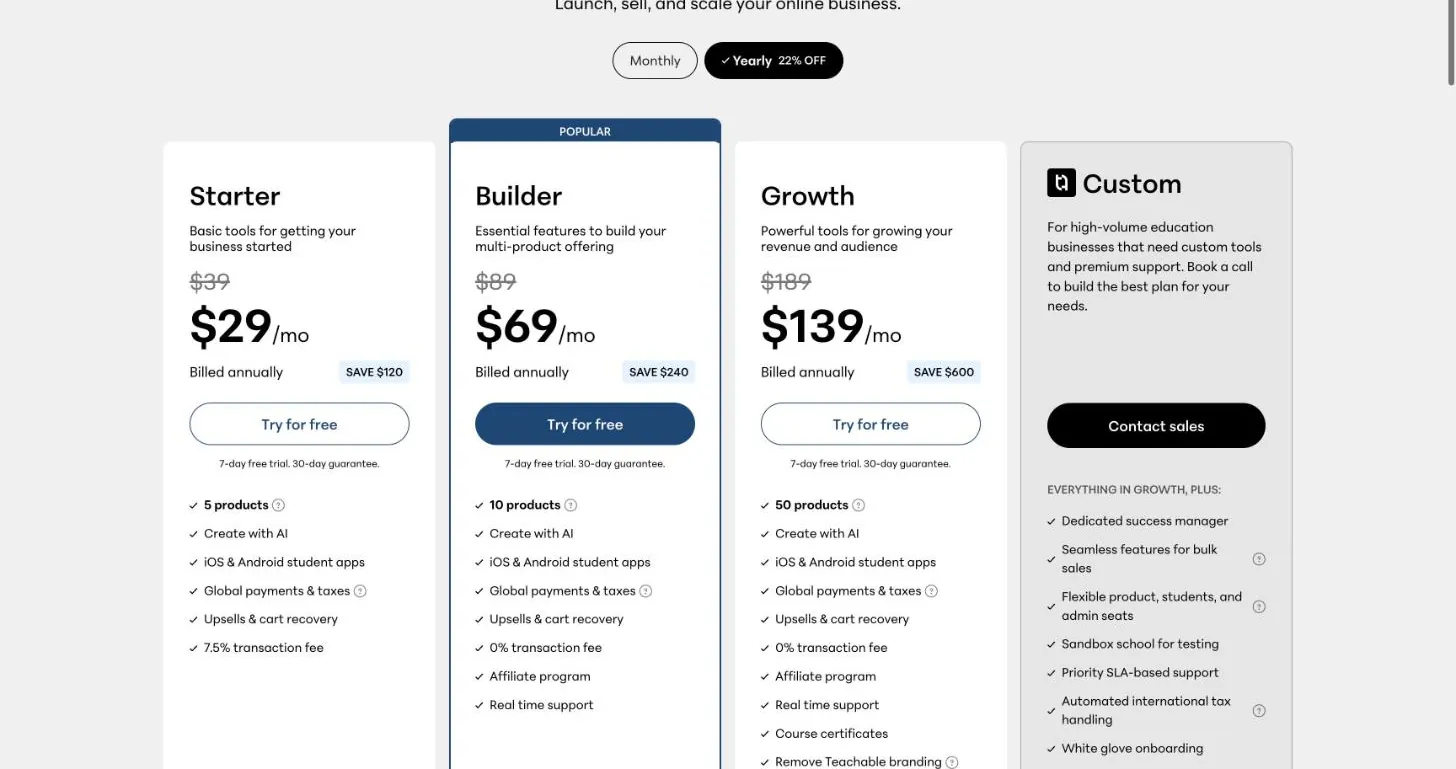
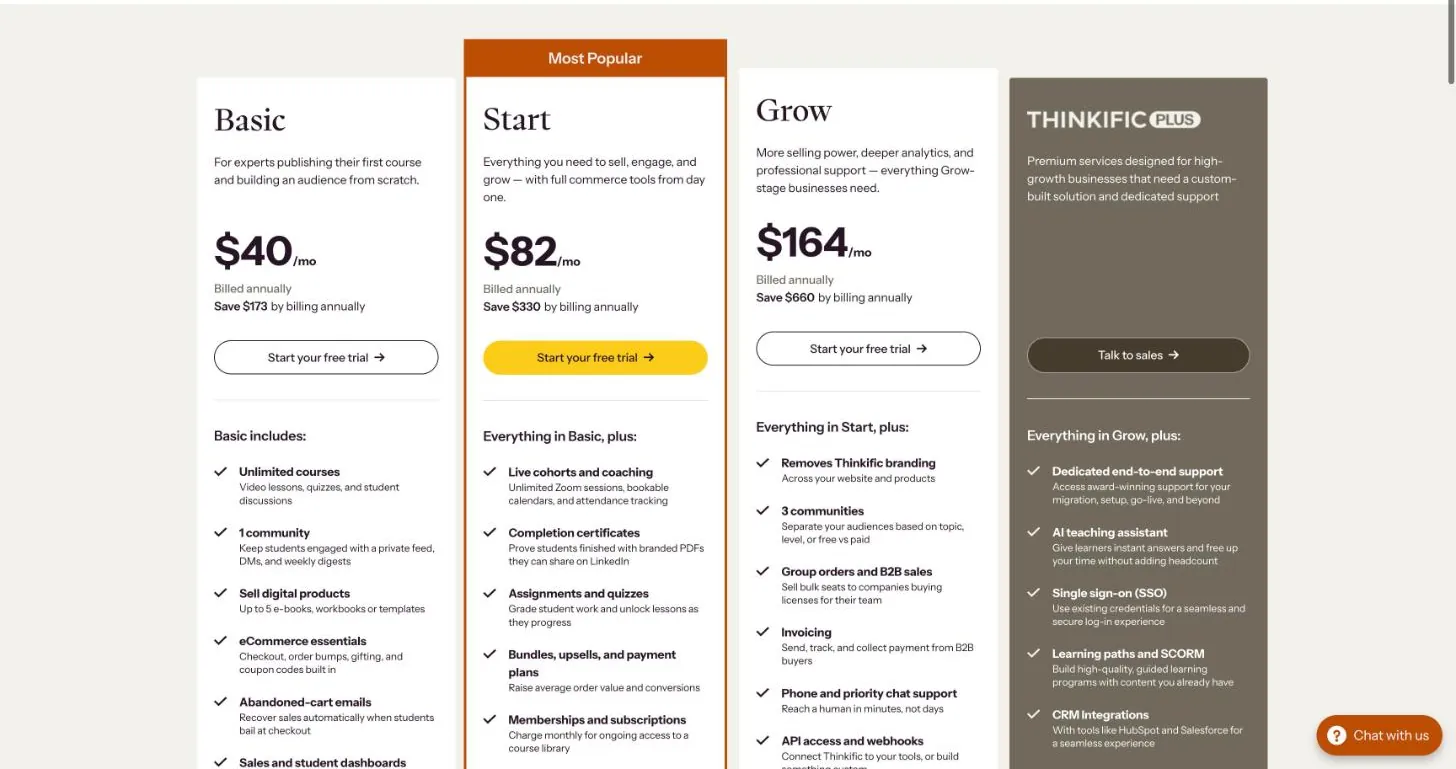
For a coding course, Teachable is the better default: it has a dedicated Code Example block for showing code in lessons, and Thinkific’s documented text editor has no code formatting at all. Thinkific wins on price at low revenue (Basic is $54/mo with no platform fee if you use Thinkific Payments), but the features a coding course usually wants, like embedded sandboxes and custom HTML, start on its $109/mo Start plan.
We haven’t run a course on either platform. Everything below comes from the two pricing pages and their help-center docs, fetched on 2026-10-12 and linked at the bottom.
A coding course has different needs from a typical course. We looked at four things that matter more when the product is code:
Teachable has a Code Example block in the lesson editor. Teachable’s help article says it shows “code in read-only form (students can view, but not run)”, and you pick a language from a dropdown. The listed languages are CSS, Dart, Go, Haskell, HTML, Java, JavaScript, JSON, Liquid, MySQL, Objective-C, PHP, Python, Ruby, Scala, Text, TypeScript and YAML.
That list matters. Rust, C, C++, C#, Kotlin, Swift and shell aren’t on it. If you teach one of those, you’d fall back to the plain “Text” option. Check this before you build a course around it.
For live embeds such as a StackBlitz or CodeSandbox iframe, Teachable has a separate Custom Code block. The help article says “Custom code is supported on the Basic plan and higher”. Basic isn’t a plan name on Teachable’s current pricing page (Starter, Builder, Growth), so confirm with Teachable whether Starter includes it. The same article warns that Teachable Support “does not guarantee the functionality, maintenance, or compatibility” of custom code. The Easy Embed block handles YouTube, Vimeo, Loom, Google Docs and Typeform by URL.
Thinkific’s help docs list the New Course Builder text block’s formatting options as headings, bold, italic, underline, lists, alignment and links. There’s no code block. Its lesson-types article suggests text lessons for material that’s “traditionally text-based (like coding or math)”, but it doesn’t describe code formatting. For iframes there’s the Multimedia lesson (“as long as the content is ‘iframeable’, it should work”). Thinkific’s pricing page lists “externally hosted and interactive content” and advanced CSS/HTML editing as not included on Basic, only from Start ($109/mo) up.
A workaround is to load a highlighter such as Prism through Site Footer Code, which is available on every plan. Thinkific’s docs say custom JavaScript “might” run in the Course Player, and the footer code has to be opted in separately for the new Course Player and Learner Hub. That’s a fragile foundation for every lesson in a course.
Takeaway: if code-on-screen is most of your course, Teachable’s built-in block is the safer bet, as long as your language is on its list.
| Teachable | Thinkific | |
|---|---|---|
| Storage / hosting | “Up to 1TB” video storage (Starter, Builder, Growth) | Hosted through Wistia, “as many videos as you like” |
| Per-file limit | 20GB per uploaded file | Each video under 3GB |
| Bandwidth | Not stated on the pricing page | 100 GB/mo (Basic), 200 GB/mo (Start), 400 GB/mo (Grow) |
| External video | YouTube/Vimeo/Loom via Easy Embed | YouTube/Vimeo via text or multimedia lessons |
The 3GB per-video cap on Thinkific is the one developers hit. A long, uncut 4K screencast can go past it, and Thinkific’s own advice is to compress with Handbrake. Splitting long sessions into shorter lessons also solves it.
The Basic bandwidth cap is worth a quick calculation. Check the file size of one of your own exported lessons. If an hour of your 1080p screencast exports at around 0.5GB (an assumption, not a vendor figure), 100 GB/mo covers about 200 student-hours of watching a month. That’s plenty for a small launch, but a popular course on Basic could outgrow it.
The figures below cover only the plan price and platform fee, on monthly billing. Card processing (2.9% on Thinkific Payments, and 2.9% + 30¢ for US cards on Teachable’s checkout) is roughly the same on both, so we left it out.
| Monthly course revenue | Teachable Starter ($39 + 7.5%) | Teachable Builder ($89, 0%*) | Thinkific Basic, Thinkific Payments ($54) | Thinkific Basic, own Stripe ($54 + 5%) | Thinkific Start, Thinkific Payments ($109) |
|---|---|---|---|---|---|
| $500 | $76.50 | $89 | $54 | $79 | $109 |
| $1,000 | $114 | $89 | $54 | $104 | $109 |
| $2,500 | $226.50 | $89 | $54 | $179 | $109 |
| $5,000 | $414 | $89 | $54 | $304 | $109 |
| $10,000 | $789 | $89 | $54 | $554 | $109 |
*Teachable’s 0% applies when you use Teachable Payments. Thinkific’s third-party gateway fee (5% Basic, 2% Start, 1% Grow, none on Plus) currently applies to Stripe transactions. Its FAQ says it will extend to PayPal and other providers later, and it stops after your first $1M in sales in a calendar year.
The break-even points:
Neither platform lets you export a course and walk away with it in one step.
For a developer, the fix is to treat the platform as a host and not as your source of truth. Write lessons in Markdown in a git repo, keep your master video files locally or in object storage, and paste into the course builder. Then a migration means re-uploading, not scraping your own course.
Best for selling online courses
Pricing: 7-day free trial; paid from $39/mo (Starter)
What we like
Watch out for
Pick Teachable if you’re showing code in most lessons and your language is on its Code Example list. Start on Starter while revenue is under about $667/mo, then move to Builder ($89/mo, 0% with Teachable Payments). Webhooks are capped at 1 on Starter, 3 on Builder and 5 on Growth, which is enough to trigger a Discord invite or a repo-access script on purchase. Builder also allows 10 products, up from 5 on Starter.
Best for course businesses that want a full LMS
Pricing: 30-day free trial; paid from $54/mo (Basic)
What we like
Watch out for
Pick Thinkific if your course is mostly video, you’re happy with plain text or images for code, and you want the cheapest fee-free setup: Basic at $54/mo with Thinkific Payments. It also has the longer trial (30 days vs Teachable’s 7). If you need embedded sandboxes or custom HTML, budget for Start at $109/mo. If you want the API or webhooks to automate access, that’s Grow at $219/mo.
Does Teachable charge transaction fees? Only on Starter, which charges 7.5%. Builder, Growth and Custom show 0% when you use Teachable Payments. Card processing fees still apply on every plan (2.9% + 30¢ for US cards).
Does Thinkific charge transaction fees? Not on Thinkific Payments. If you process through your own Stripe account, there’s a third-party gateway fee of 5% on Basic, 2% on Start and 1% on Grow, with none on Plus for now.
Can I export my course from Teachable or Thinkific? Not as a single package. Both let you download files one at a time and export student lists as CSV, but lesson text has to be copied out by hand. Keep your own copies.
Which is cheaper for a small coding course? Thinkific Basic ($54/mo) is the cheapest fee-free option, but it excludes embedded interactive content. Teachable Starter ($39/mo) is cheaper until your revenue passes about $200/mo, after which its 7.5% fee makes it the more expensive choice.
 Course platforms
systeme.io, Teachable, Thinkific and Podia priced against Kajabi at $2k and $10k a month, plus what each one drops from Kajabi's bundle.
Updated Oct 12, 2026